What Makes a Clean, Professional Vector File?
Many files are technically “vector” but still fail professional standards. Clean vector structure is essential for printing, editing, and long-term brand use.
👉 Internal link: Why Logo Conversion Service like VECTORMAN is the best to use?
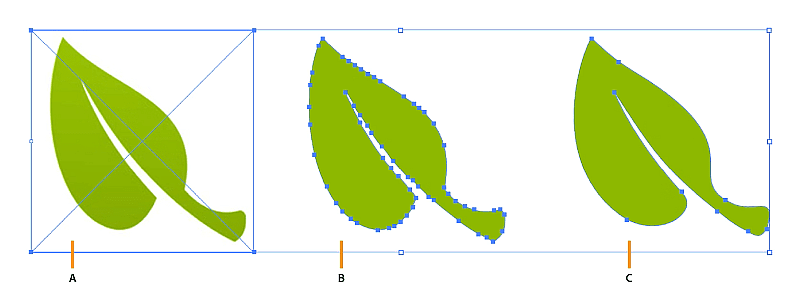
Minimal Anchor Points and Smooth Curves
Professional vectors use only the necessary number of anchor points. Excess points create jagged edges and make files difficult to edit.
Smooth Bézier curves ensure consistent shapes and clean reproduction at any size.
👉 Internal link: How to turn an image into a Vector
Closed Paths and Logical Structure
All shapes should be properly closed and organised into logical layers. Open paths and overlapping objects can cause printing and cutting errors.
Well-structured files reduce errors and simplify future edits.
👉 Internal link: How Do I Edit an EPS Vector File?
Problems Caused by Poor Vector Files
Messy vectors can lead to:
Printing defects
Increased production time
Larger file sizes
Inconsistent branding
👉 Internal link: Why Vector Graphics Are Essential for Your Brand’s Scalability
Professional Vector Standards
Vectorman follows professional standards used by printers, sign makers, and manufacturers worldwide, ensuring reliability across all applications.
👉 Internal link: Why Choose Vectorman for Your Vector Conversion Needs
“Clean vector paths with minimal anchor points compared to messy vector paths, technical design style”
Need your logo or image as a true vector?
Send it to VectorMan and we’ll redraw it by hand in Illustrator as a clean, editable vector (EPS, AI, SVG). From $55 · Free quote · Most jobs back within 24 hours.